Part 2 of 3The product
Everything that is already finished
This is what your team can use on day one, photographed in the running product. It is not every screen — it is the nine things a principal actually asks about, in the order they tend to ask them. The seventh is the part your own staff control without an engineer, and it is where extending the platform for your agency begins.
The working application
Open a client and the work is already proposed
Your producers open a ranked list — renewals coming due, accounts that need a call, conversations that stalled overnight. This is what they find when they pick one: the account assembled, the reasoning printed, and the next few things worth doing already written down.
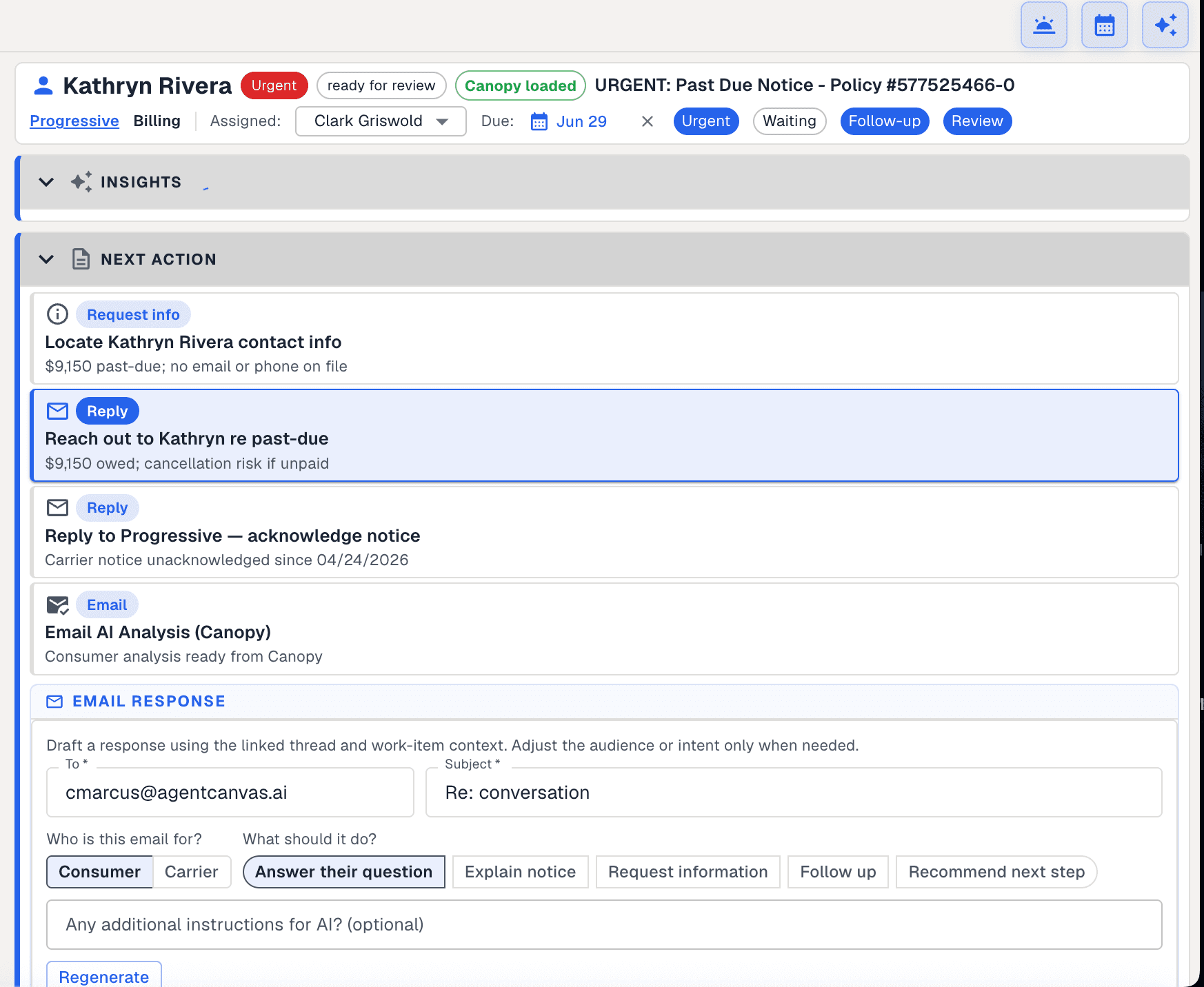
Every action there has a reason underneath it, drawn from the record: a balance that puts the policy at risk of cancellation, contact details that are missing, a carrier notice nobody has answered since April. The ranking behind the list is built from the same full picture — policies, claims, email, anything already flagged — so it reflects what is true about a client rather than what changed most recently, and it rebuilds itself as new mail and carrier data arrive.
Every item carries an owner, a due date and a next action, not just a description of what happened.
Items are ranked rather than listed by date. What matters most sits at the top.
Assignment is visible to the whole agency, so coverage never depends on one person remembering.
And the client you open is already assembled
Nobody put that record together by hand, and nobody keeps it up to date by hand either.
Everything about the household is already there: the policies they hold and with whom, the cars, the property, the drivers, the documents, and every claim they have made. The detail comes from the carrier itself, with the client’s permission — declarations and ID cards, vehicles by year and model, the property and its address, the coverages and their limits, and the claims with their status.
The claims are what make the rest possible. An open wind and hail claim is not a line in a file here; it is a fact the AI has, so it can tell a producer to chase the settlement before the policy renews. And the score on the account is not a black box — the reasoning sits next to it in plain terms, the policies they hold, the value of what is insured, the claims and violations behind it, and where there is room to write more. A producer can agree or disagree with it on the spot, which is the only way a score ever gets used.
The way in that always works
Send it straight from the systems you already run
The route with no prerequisites: no supplier to sign up with, and nobody to ask first. If your agency holds a record anywhere — the management system, the rating platform, your customer records, a list of leads — you can send it in and have the AI read it. It is the only route here that reaches a client nobody has asked, or a lead who is not a client yet.
What this reaches that a carrier pull cannot
- Clients who have not been asked, and leads who are not clients yet
- Households whose carrier was never connected to anything
- The book you already hold, in the system you already keep it in
- Step 1Fill in the form we have defined from your own records
- Step 2Send it to us, and say where it came from
- Step 3It lands in the same list as everything else
- Step 4The AI reads it on arrival
- Step 5The reading comes back in the same reply
Steps three onwards are the same steps every other route takes. There is not a second version of the platform for records that arrive this way.
The form is already defined
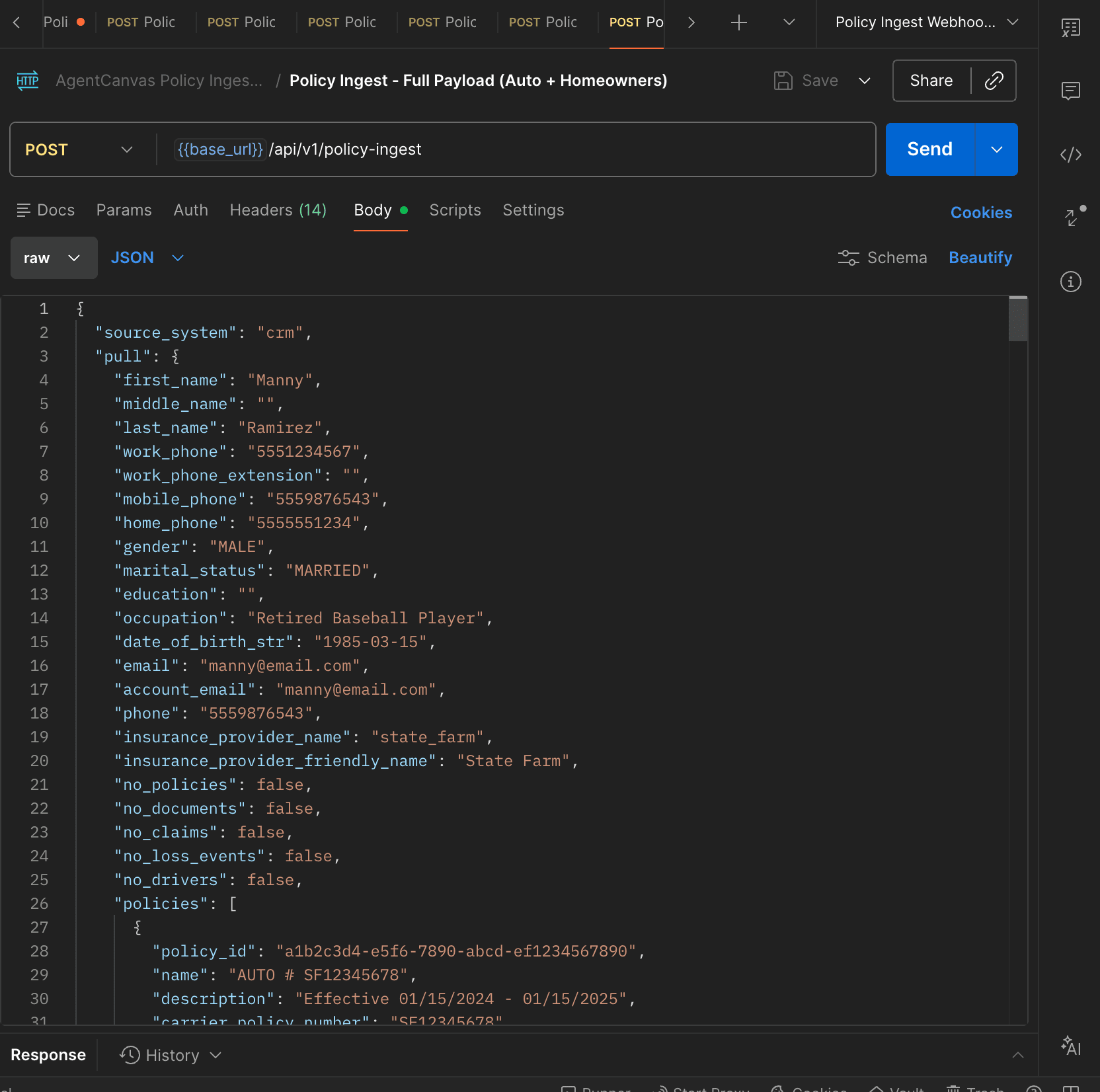
Below is the whole of it — the person, their household, every policy with its carrier, dates, premium and documents. Your engineers map your records onto it once, and it keeps running on that mapping until you change what you send.
You say where it came from
Every record carries a note of which system it came out of, and that note is required rather than optional. It stays on the record, so a producer — or anyone auditing it later — can see that this one came from the rating platform and that one from a carrier pull.
And the reading comes back with the answer
With the AI switched on, the record is read as it arrives and what the AI made of it comes back in the same reply — the producer briefing, or the client-facing version. Your systems can store it or act on it without anyone opening the platform. Whether the AI runs at all is your agency’s setting, and it is off until you turn it on.
One shape, whatever the source
A record sent this way and one from a permissioned pull become the same thing before anything reads them — same lists, same client screens, same findings, same next actions.
Part 3 has the exact fields, what proves a request came from you, and what comes back.
The richest way in, where it applies
Then most of the hard part is behind you
The richest way in, where it applies. It needs two things you do not control — your agency running Canopy Connect, and the client agreeing — so it covers part of a book rather than all of it. Where it does apply it is the shortest path on this page: the expensive half of the problem is already solved and paid for, and what is missing is anything reading the data the moment it lands.
What you already have
- The consumer permission, and the flow that collects it
- The carrier connections behind it, and whatever they return
- The declarations pages, parsed rather than filed
What is missing
The pull lands and waits for somebody to read it. Nothing scores the account, writes the producer a briefing, or notices that the named insured does not match the client. The data is good. It is just sitting there.
Route one
A producer pushes it, from inside Canopy
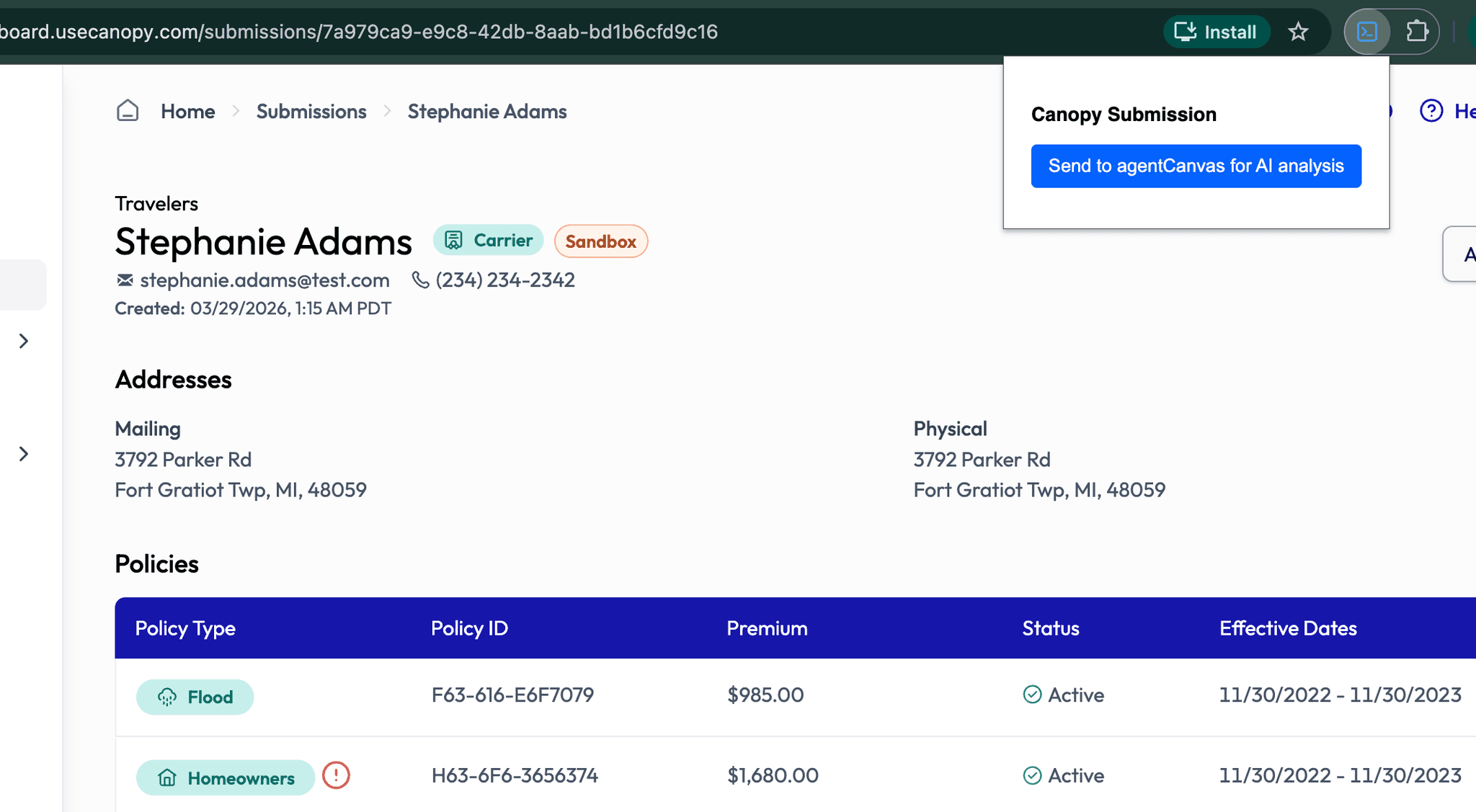
Best when your producer already has the submission open — a quote that came in, a household they are working.
Push it across from Canopy
Your producer is already in the Canopy dashboard. The add-on puts one action beside the submission they are looking at, and that is the whole interaction.
Route two
Or you ask the client, from inside agentCanvas
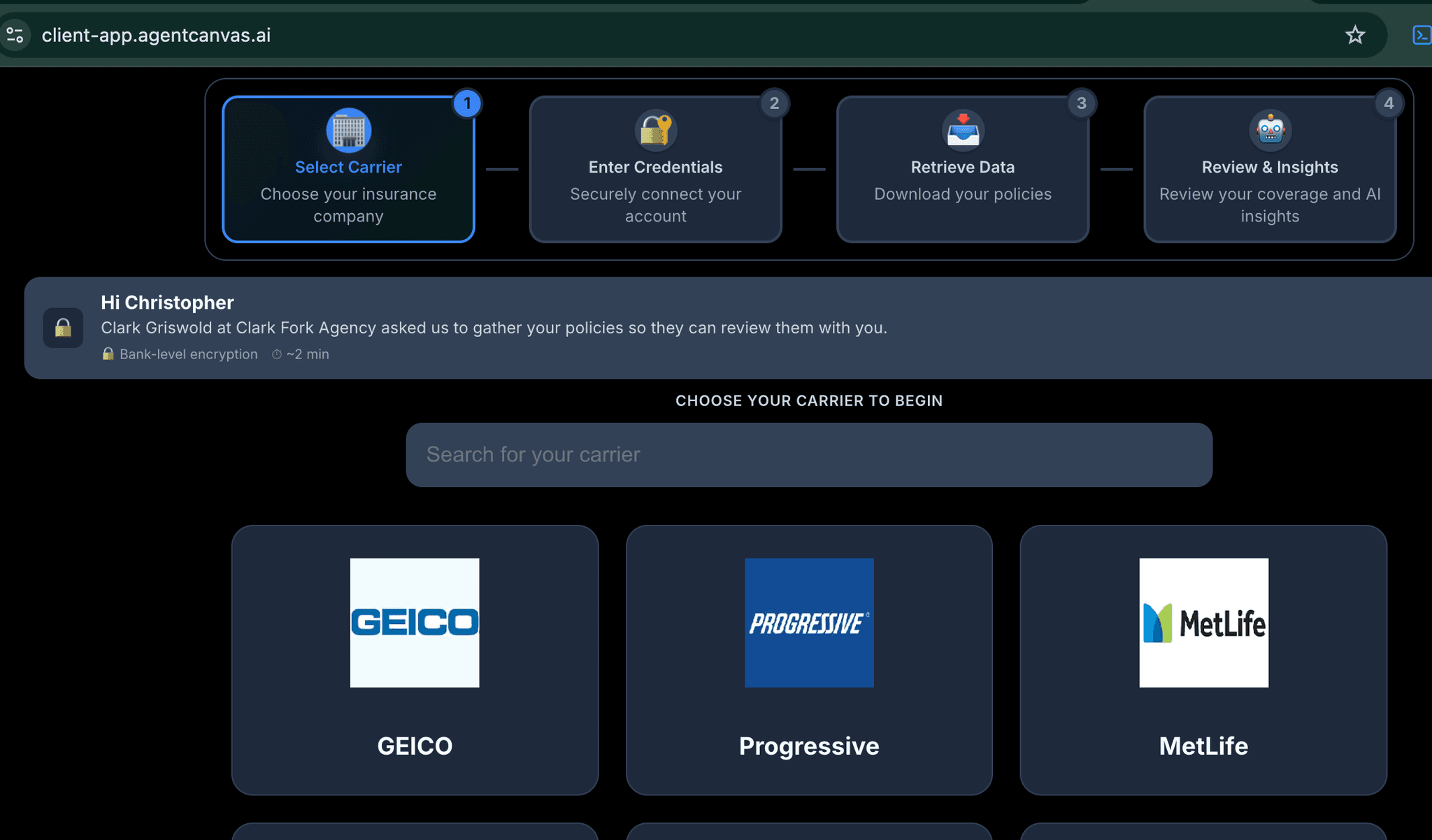
Best when you want the data and nobody has it yet — a renewal review, a referral, a book you are trying to round out. You send the request; the client does the rest, in an application carrying your name. That application is the second of the two you are buying, and it has its own section further down.
Send the client a link
Or start it from this side. The client opens your app — your domain, your name, the producer who asked named at the top — and picks their carrier.
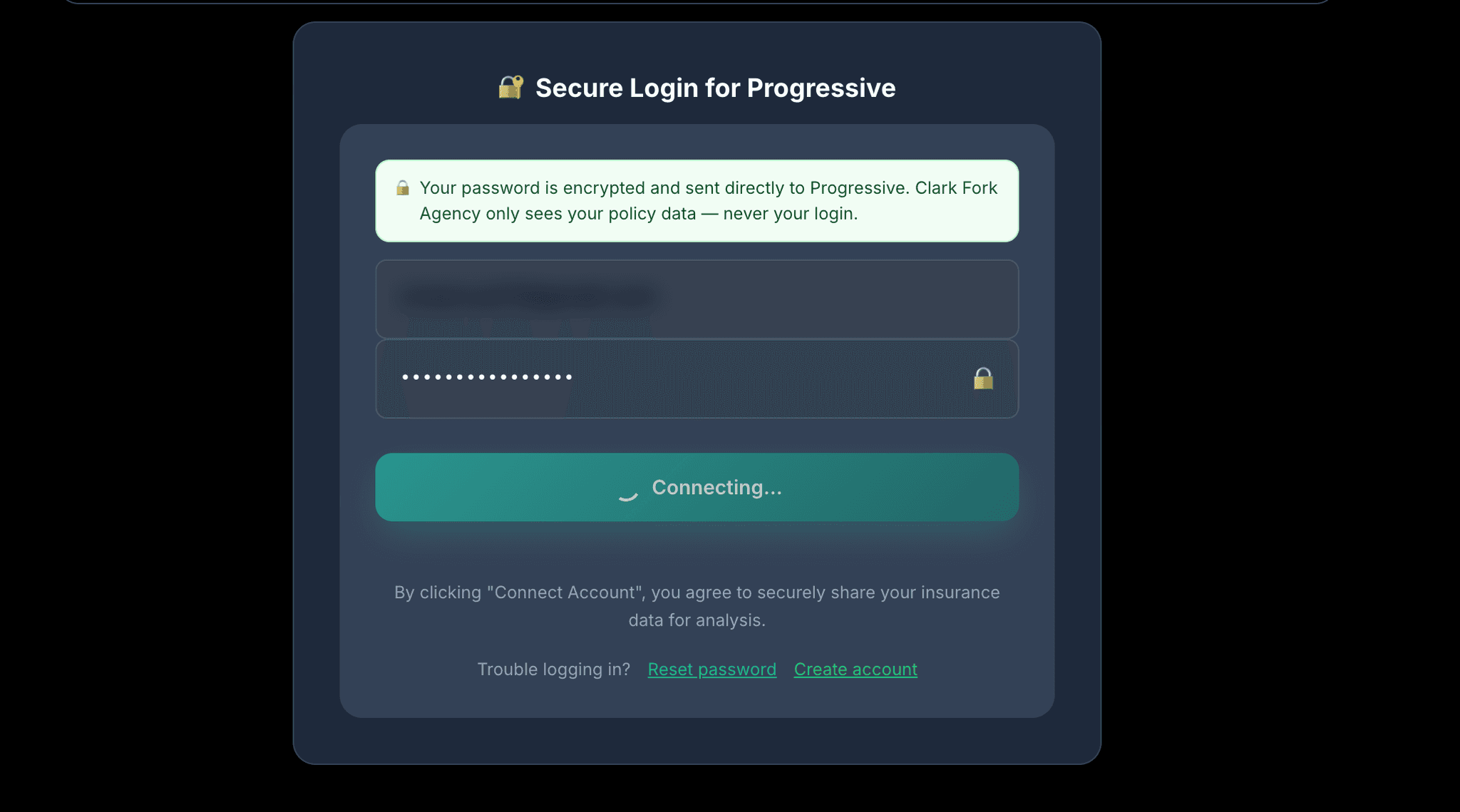
They sign in to their own carrier
The credentials never reach your agency. You get the policy data and never the password, which is the first thing a client asks.
Route one and two
Both end up in the same place, and then the work starts
Which is the point of showing them side by side. The route is a detail; what happens next does not change.
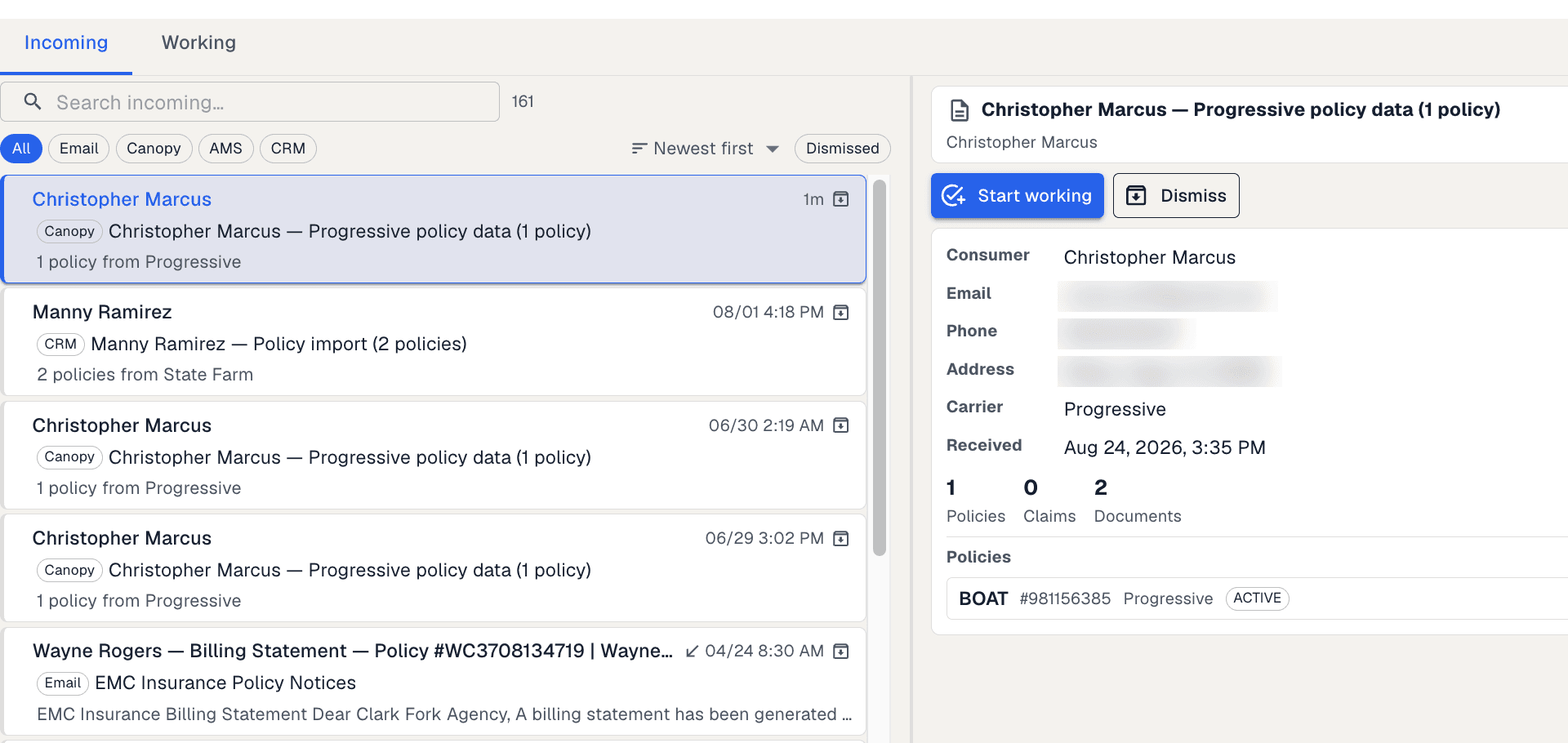
It lands in one list
Whichever route it took, it arrives where everything else does — filed beside email and the records your own systems send in.
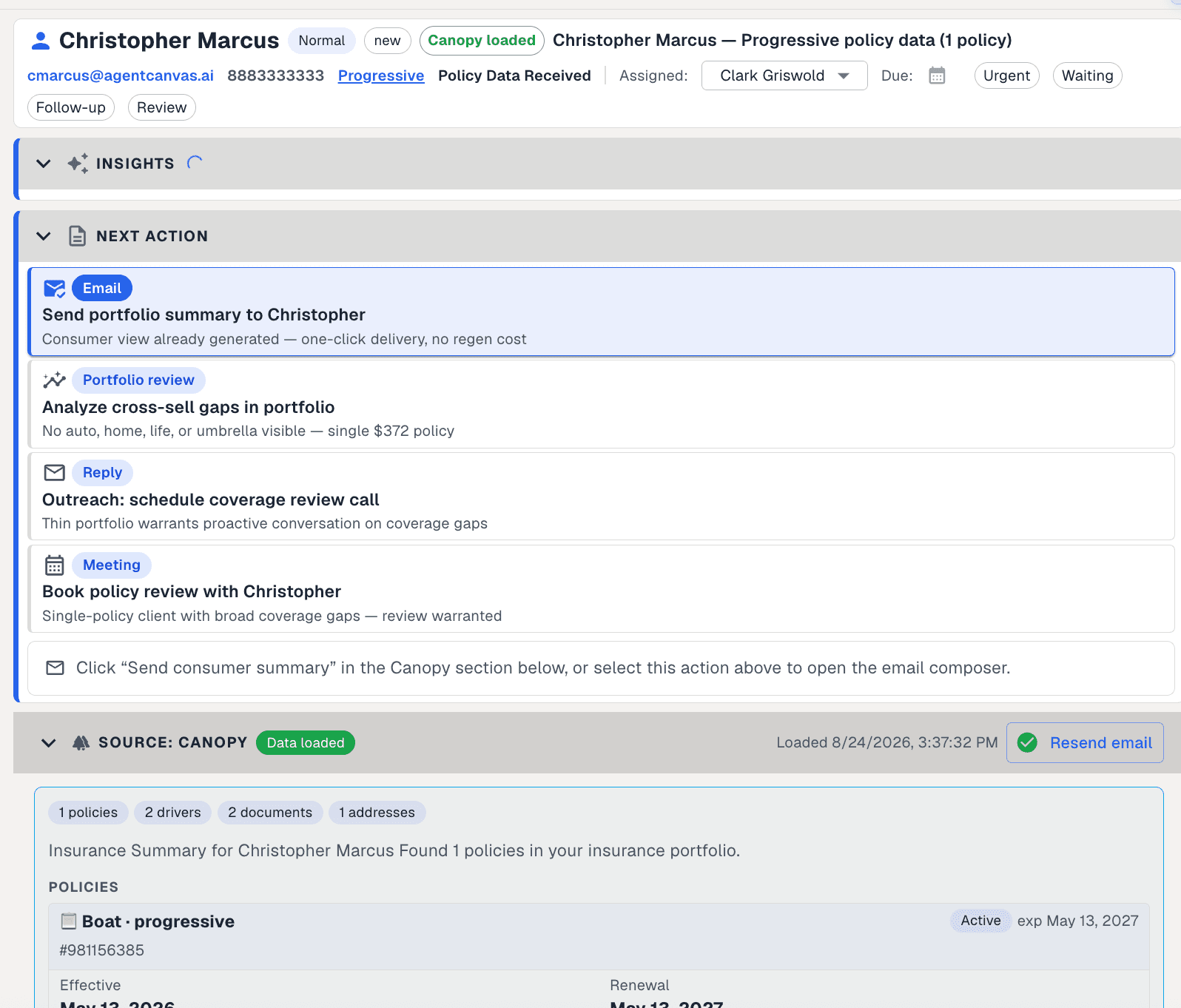
And it is already actionable
By the time a producer opens it, the record is broken out, scored, and carrying the next things worth doing — each with the reason it was suggested.
And this is where your own instructions come in. A prompt your staff wrote — an errors-and-omissions audit, a renewal brief, a cross-sell check — can be marked to run on arrival, so it works on every record the moment it lands rather than when somebody remembers. A later section shows one of those, and what it caught.
And if you do not run Canopy Connect, or the client will not consent
Then nothing in this section applies to you, and you have lost nothing. The route above has no prerequisites, and mailboxes can also be connected and read backwards through their history. Because every source becomes the same shape before anything reads it, adding a permissioned pull later is a piece of translation rather than a second system.
Part 3 sets out all four ways in, including what stops somebody pushing data in pretending to be you.
The second application
And one your clients see, carrying your name
Two applications change hands, not one. The first is the workspace your producers open. The second is this: a consumer-facing application branded to the agency rather than to me, where a client can be invited to share their coverage and gets something back for doing it. Both transfer with the sale, source and all.
What the client gets
Their own portfolio: every policy with its dates and premium, their declarations pages listed as documents they can open, and the producer who asked for it named at the top. The credentials they use to reach their carrier never touch your agency — you receive the policy data and never the password, which is the first thing a client wants to know.
And what it is worth to a network
One agency puts its own name on it. A network can put each member agency’s name on it — the same application, presented as that member’s own, across as many of them as you choose to turn on. That is a consumer-facing product you would otherwise be commissioning separately for every member, and it arrives with the rest.
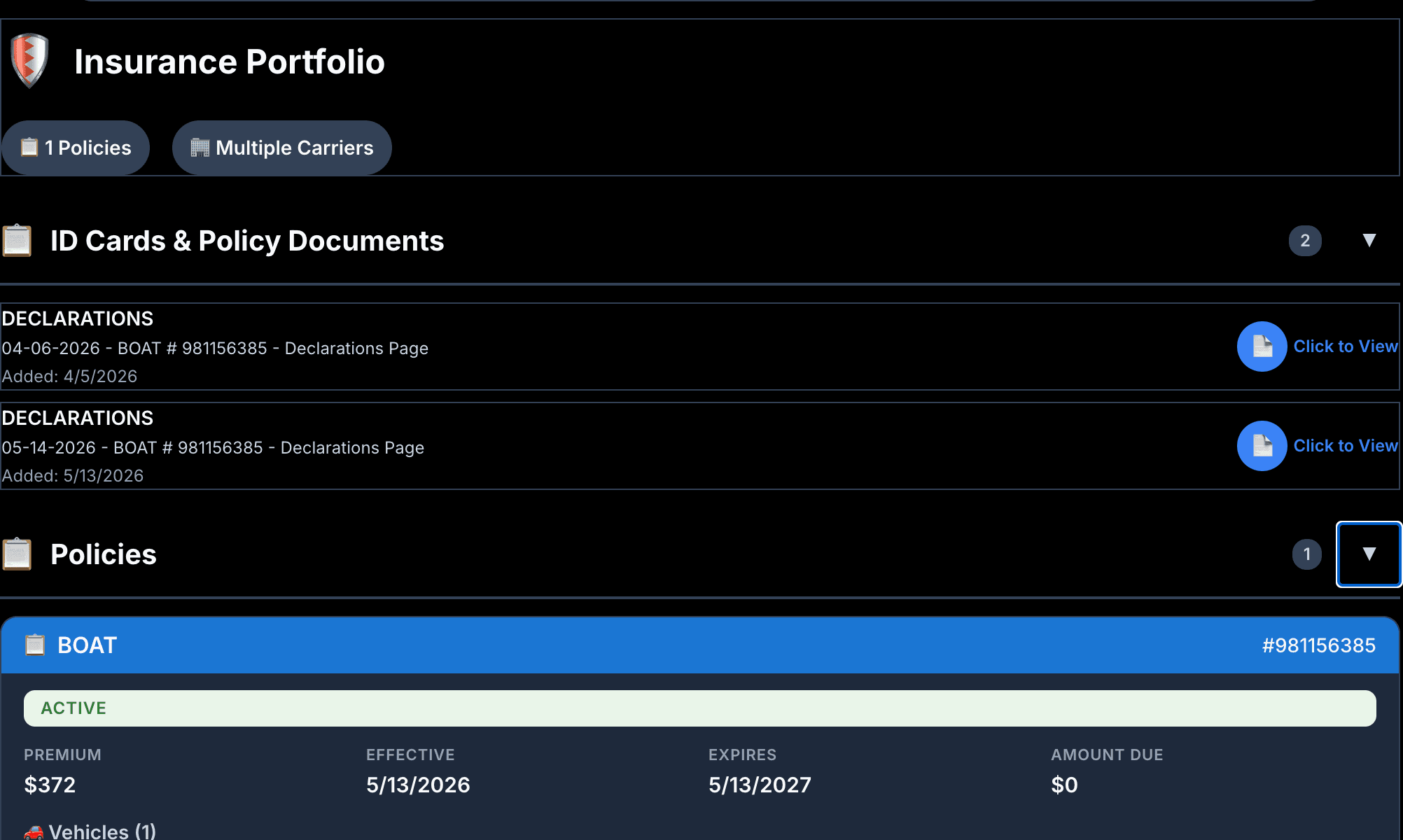
This is the one part of the platform still carrying a dark interface while the rest was moved to light. It is what ships today rather than a mock-up, so it is shown as it is; matching it to the other application is on the list of things a new owner would do early, and it is a styling job rather than a rebuild.
If you serve member agencies
Running it across a network, not an office
Most of this page reads as though one agency is looking at it. If you are buying for a network, three questions come up every time: whether members can see each other, what stops AI spend running away across hundreds of agencies, and what putting them all on it actually involves — including the two things a network wants that are not built yet.
One: two members who compete in the same town
Your members will ask you this, not us. The answer worth having is one that does not depend on the network being careful.
- Each member agency gets a database of its own, not a share of one
- Each has its own keys, its own ceiling on what it can send, and its own address for results
- Each keeps its own rules, its own carrier appetite and its own compliance record
A mistake in a query cannot return another agency’s book, because that book is not in the database the connection is attached to. Part 3 names the one tier where separation rests on review rather than on the connection.
Two: what stops AI spend running away
Model prices fall and bills still rise, because when the work gets cheaper more of it gets done. A per-use cost across hundreds of agencies is not controlled by picking a cheaper supplier — it is controlled in the software, and it has to be built in rather than watched afterwards.
Every call is costed as it happens
What each piece of AI work used, and what it cost, recorded at the time and readable for one member agency on its own.
A ceiling on each piece of work
Work is sized before it runs — routine goes to a cheaper model, genuinely hard is allowed more. Either way there is an upper limit per piece of work the platform will not cross.
Switched off until you switch it on
The AI is off for a member until you turn it on, and it fails closed: if the setting cannot be read, nothing runs. Onboarding a member does not commit you to their spend.
A ceiling on what each member can send
How much any one agency can push in is capped separately, so one member cannot spend the network’s budget or slow anyone else down.
And none of it is paid to us. Model calls run on your own account at your supplier’s prices — nothing routed through us, nothing marked up, no per-member fee that runs forever. What is still yours to build is the reporting on top: figures are recorded per member and can be read back, but a screen that puts them in front of a finance team is not written yet.
Three: what it actually takes to run
What does adding a member involve?
Setting one up is configuration rather than a software release, so it does not queue behind an engineering cycle. Five hundred of them is still a programme with a schedule and someone running it — a rollout to plan, not a button to press, and anyone telling you otherwise has not done it.
Who supports a producer at four in the afternoon?
You do. It is bought outright and run by you, so first-line support sits with whoever supports your members today. What transfers is the software, the written material behind it, and the tests that tell your team whether a change broke something.
Can we set a baseline every member inherits?
Not today. Each member holds its own instructions, rules and carrier appetite — which is what keeps them separate — but there is no parent level pushing a standard set down for members to override. The place it would be built is the path a new member is set up through. If your network runs on one set of standards rather than five hundred, treat this as work to do.
How does the parent organisation see across members?
Not out of the box, and deliberately so: the separation that stops two competing members seeing each other also stops a query reaching across them. The raw material is there — cost, usage and compliance records are kept per member — but assembling it into network reporting is something you build. Upside, not something already shipped.
What the AI actually produces
Two pieces of work, from the same reading
This is the part worth judging the whole platform on. From one pass over a client's record it writes two things: a briefing for the producer who owns the account, and a review the client can be sent.
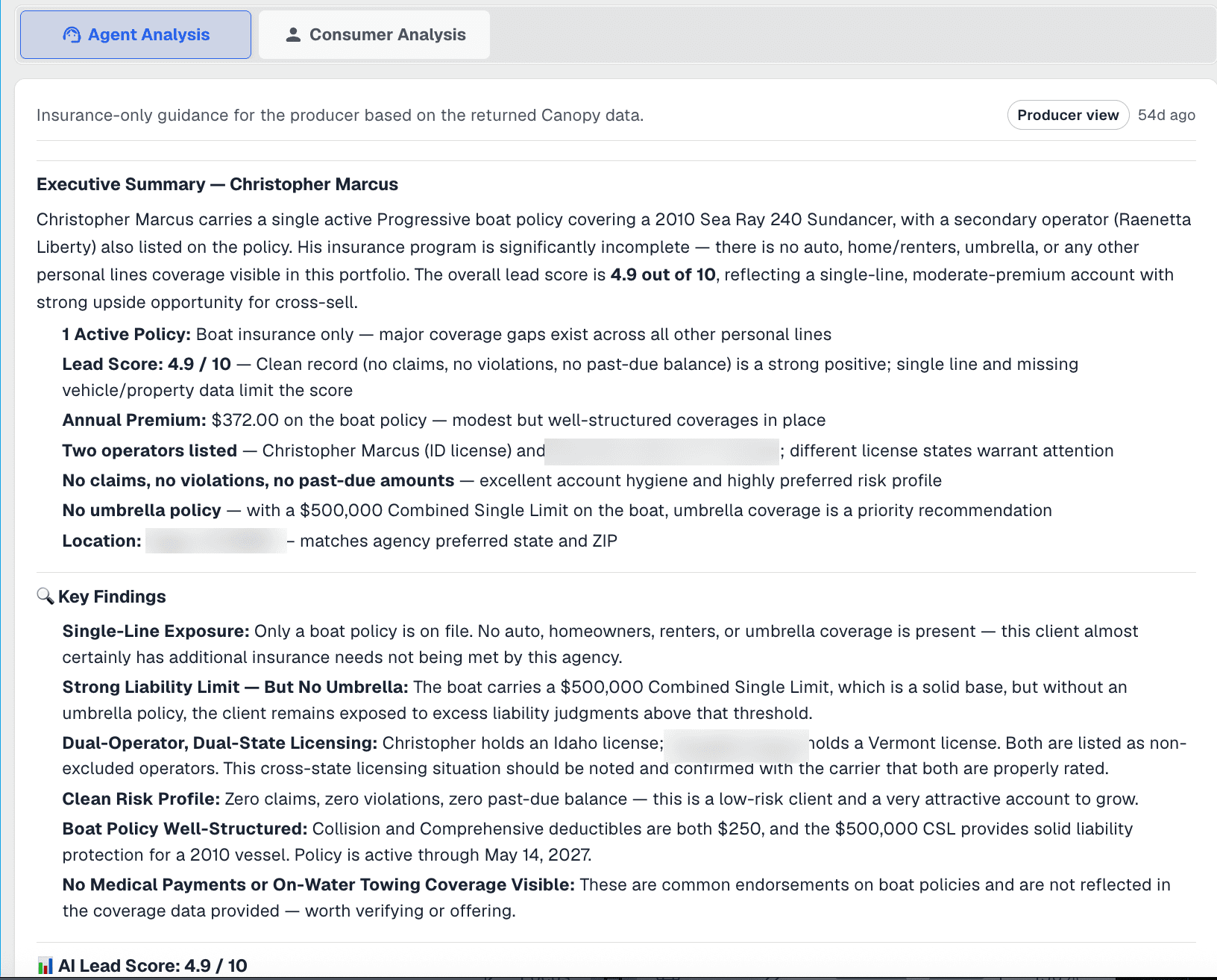 Written for your producer
The producer's version is blunt and useful: a score with the reasoning printed beside it, the premium at stake, the umbrella nobody ever wrote on a household that plainly needs one, and the fact that this client sits in a state you have said you want. It also says what is already fine, so nobody wastes a call.
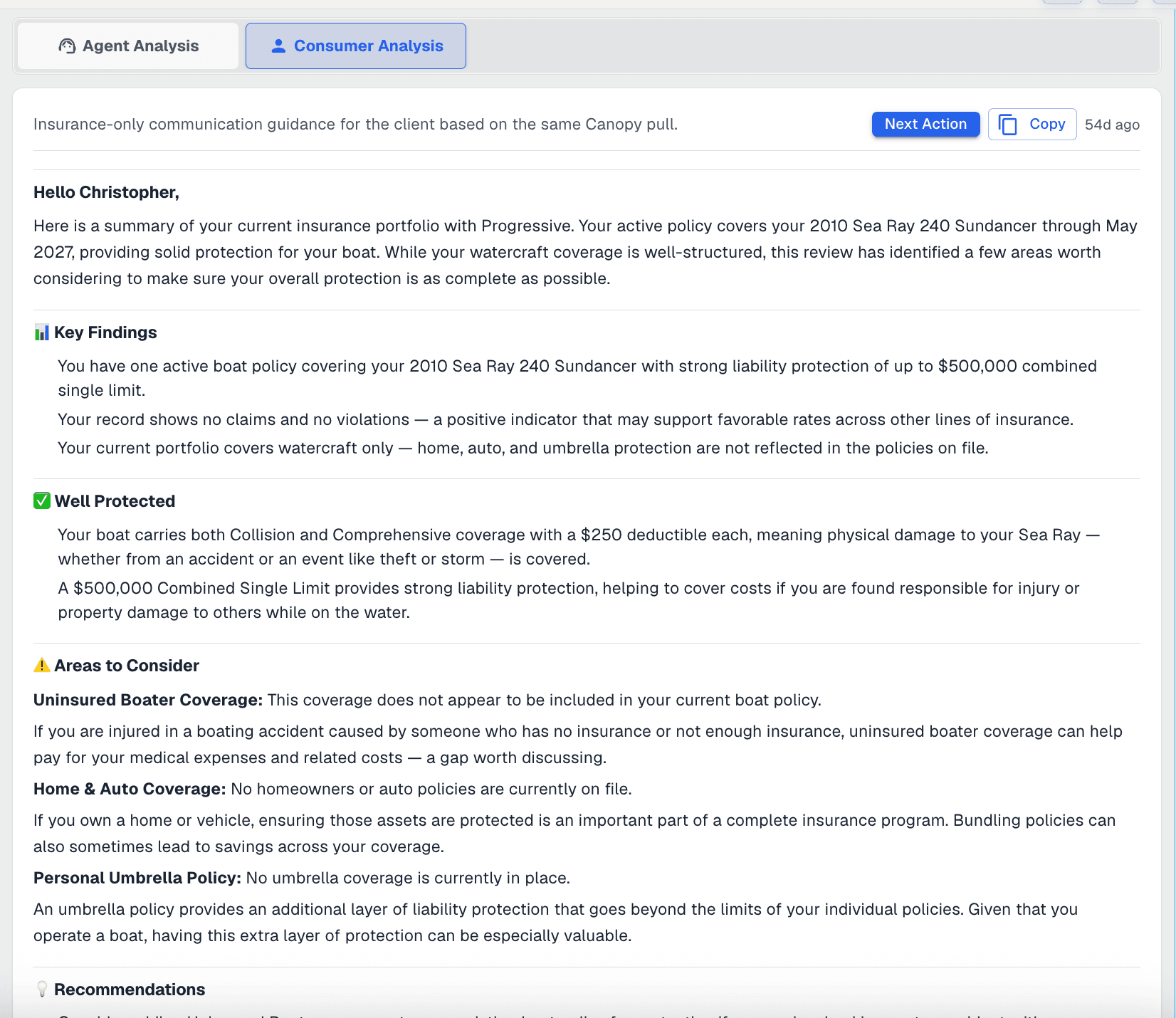 Written for your client
The client's version says the same things in the register you would use in a letter — what they are well covered for, where they are thin, and what to do about it — and it signs off with your agency's name and number. A producer reads it, changes what they want, and sends it.
Both come out of one reading, which is the point: your producer and your client are never working from two different versions of the account. And the same reading is what surfaces the things nobody has the hours to go looking for — a house insured for less than it would cost to rebuild, coverage that was quoted and never bound, a driver in the household who is not on the policy. Across every client you connect, that is work no agency can do by hand. The next section is one of those found and written up in full.
Making it yours
What your own staff can make it do
Everything in this section is a setting or a written instruction, changed by your own admins inside the product rather than requested from an engineer. It is the layer most agencies will live in, and it is where the difference between this and a chat window with your documents attached stops being an argument. Underneath it, your engineers have the source code and no ceiling at all.
Your staff write the instructions the AI follows
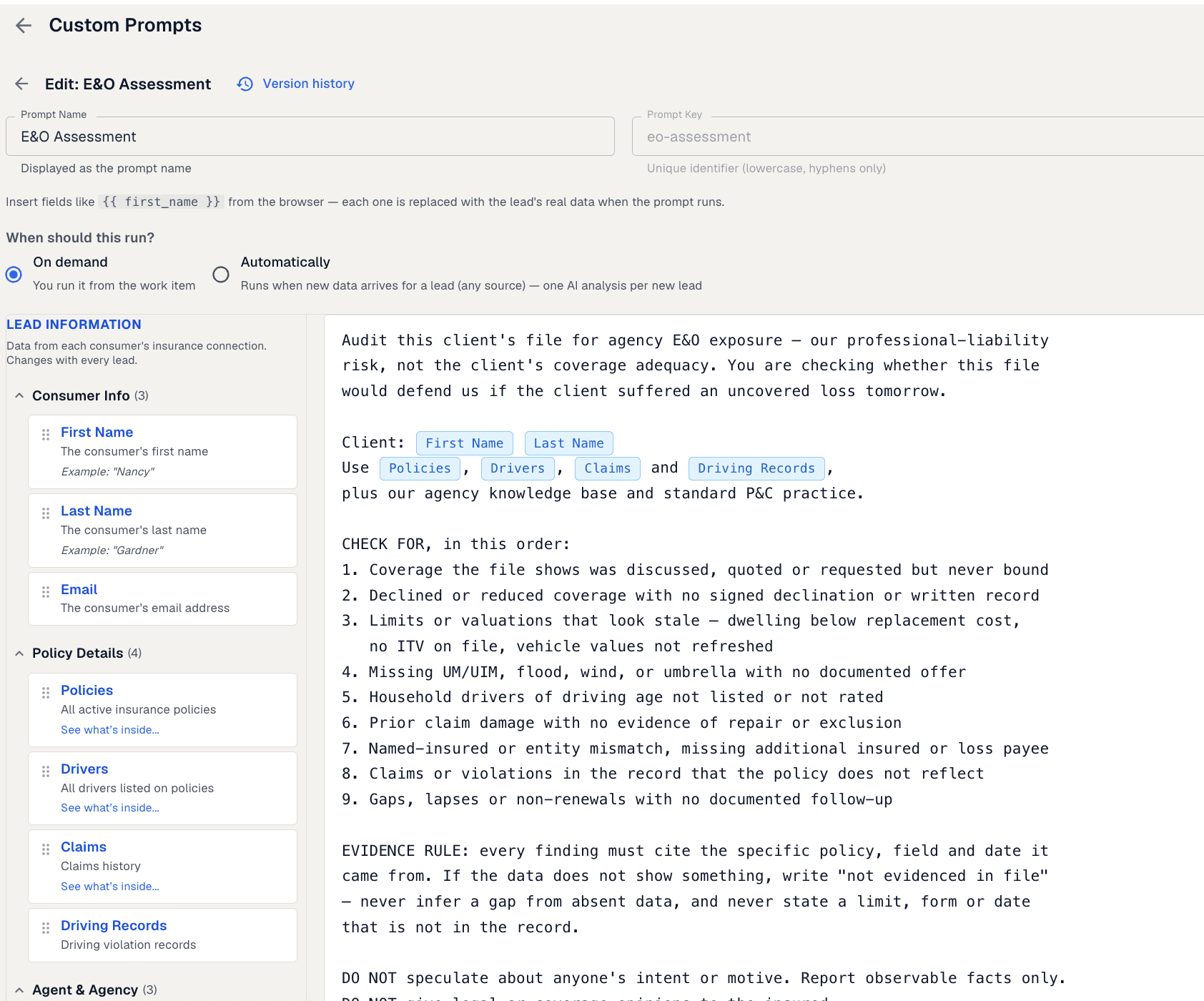
A prompt is the written instruction the AI works to. Your admins write them in the product, test them against a real record before saving, and keep every version with the reason it changed. Nothing here needs an engineer, and nothing here needs me.
Read what it is asking for. Coverage that was discussed but never bound. A declination with nothing signed. A dwelling limit below what it would cost to rebuild. A household driver of driving age who is not on the policy. A named insured that does not match the client. Nine checks in all, in the order the agency wants them run, written in the language your staff already use with each other.
The rule underneath is the part a principal should notice: every finding cites the policy, the record and the date it came from, and where it cannot, it is not reported.
The instruction
What it found on one client
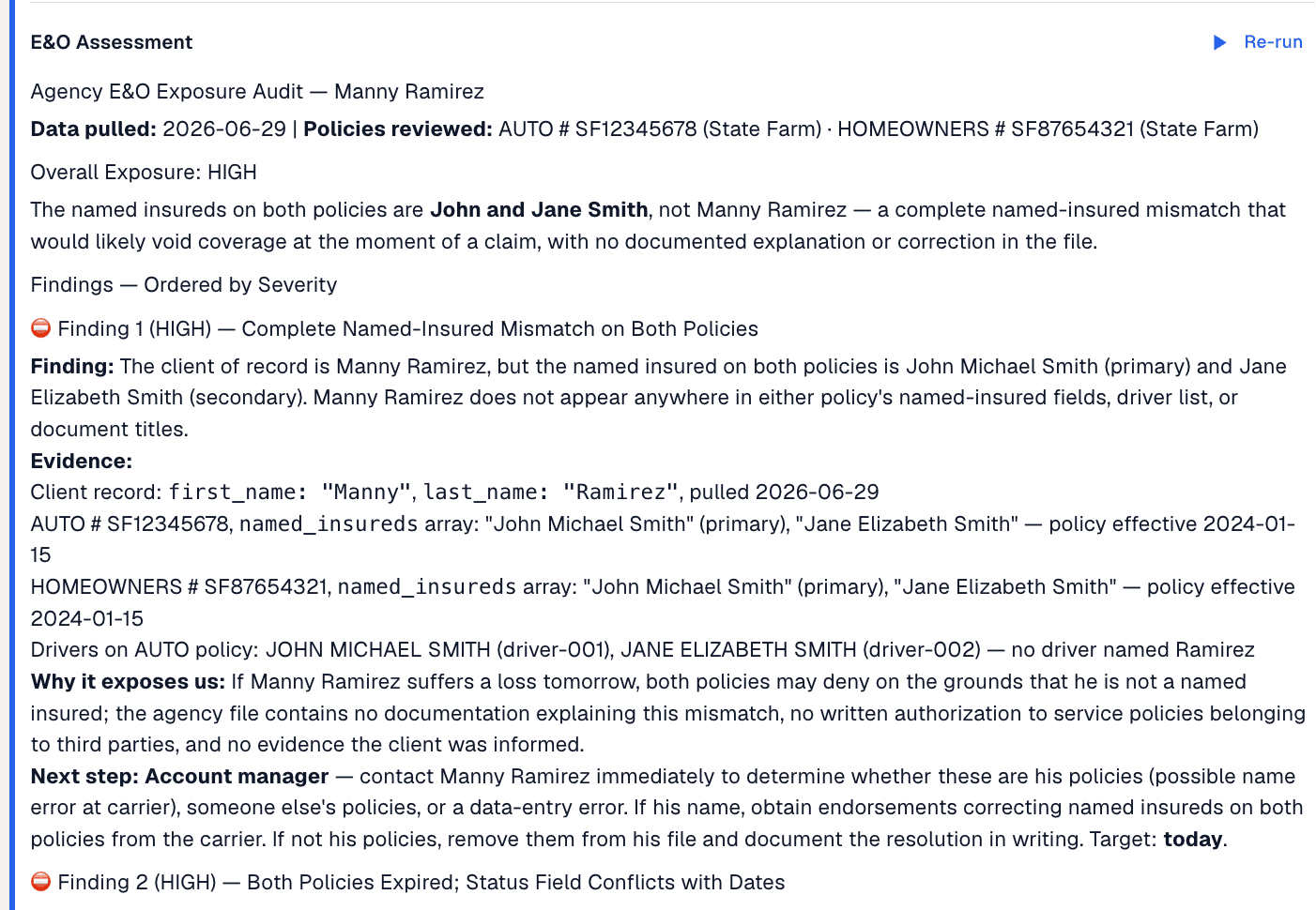
Nothing about that find needed a release, a consultant or a ticket. A member of staff wrote the instruction, and it now runs on any account your producers point it at.
Written by your own staff
Filled in from the record being read
Tested before anyone relies on it
Every edit is kept
Written by admins, used by everyone
And the rules it works to are yours
The same is true of everything the AI reads before it writes a word, and of the voice it writes in. All of it is a screen in the product.
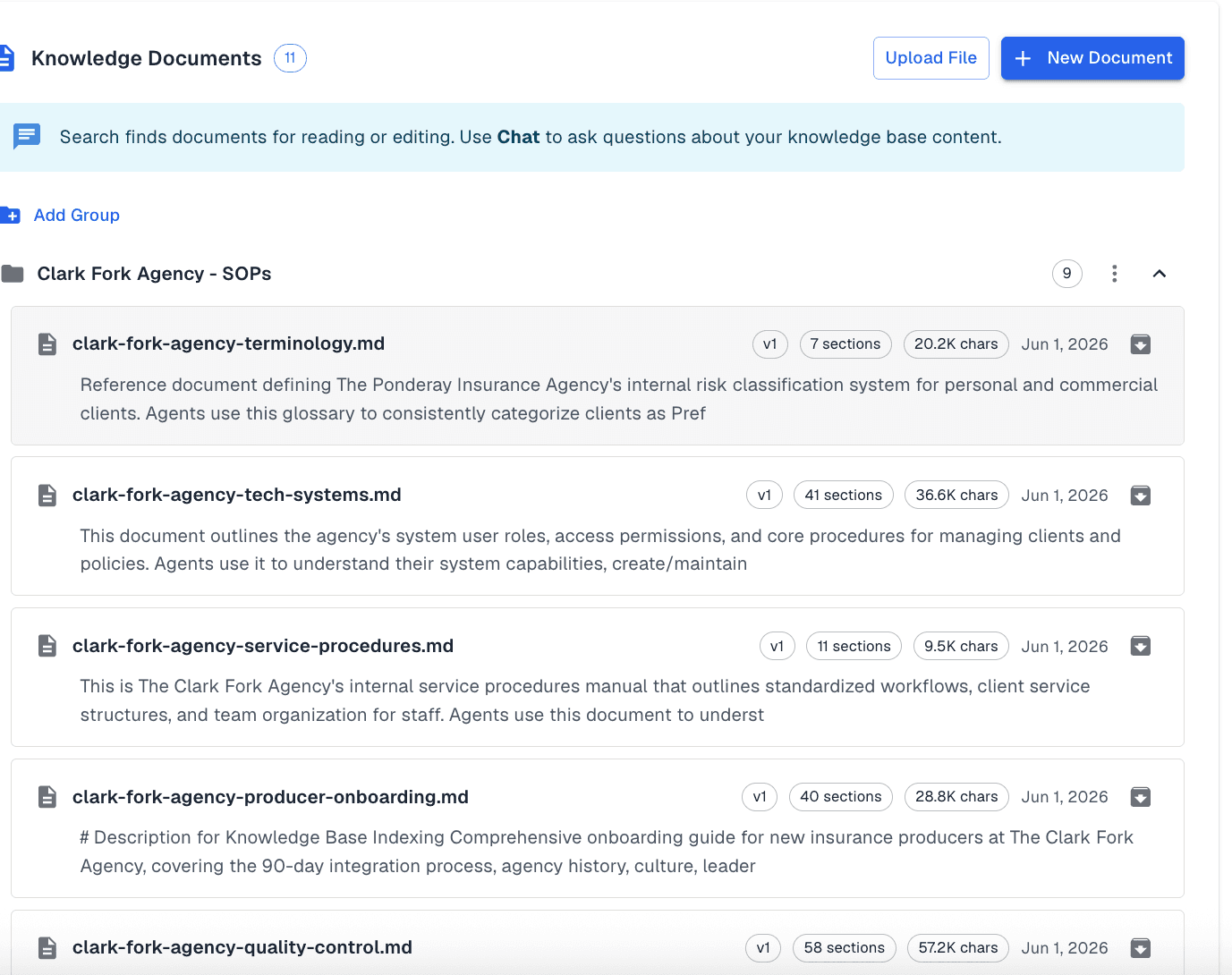
Your rules, in writing
Your procedures, commission plans and internal rules go in once, and the AI reads them while it works — so what it recommends matches how your agency actually operates.
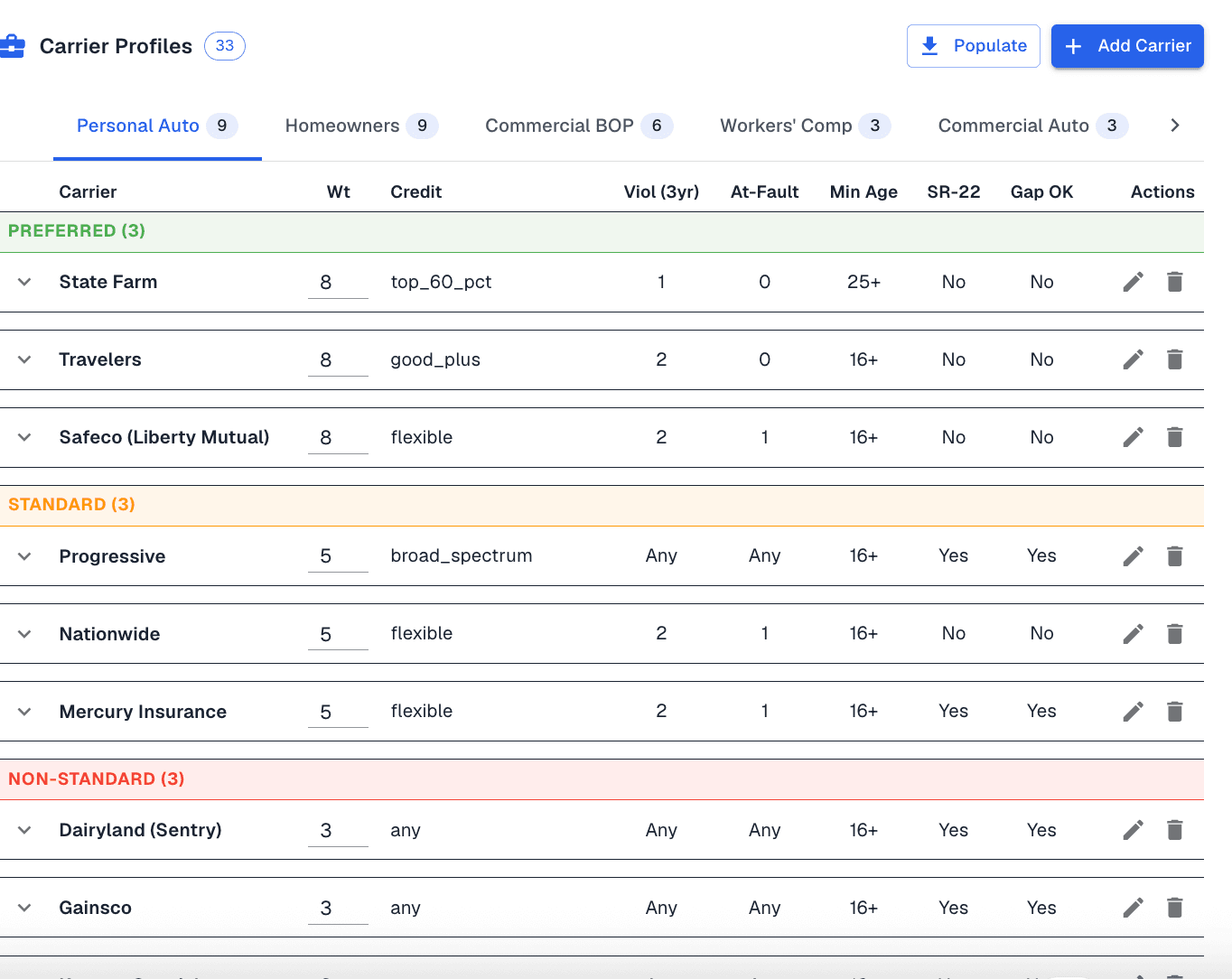
Which carriers want which risks
Your carrier appetite as a table per line of business — the tier each carrier sits in, the credit it looks at, what it tolerates on violations and young drivers. Your producers stop asking each other, and the AI ranks carriers the way your agency would.
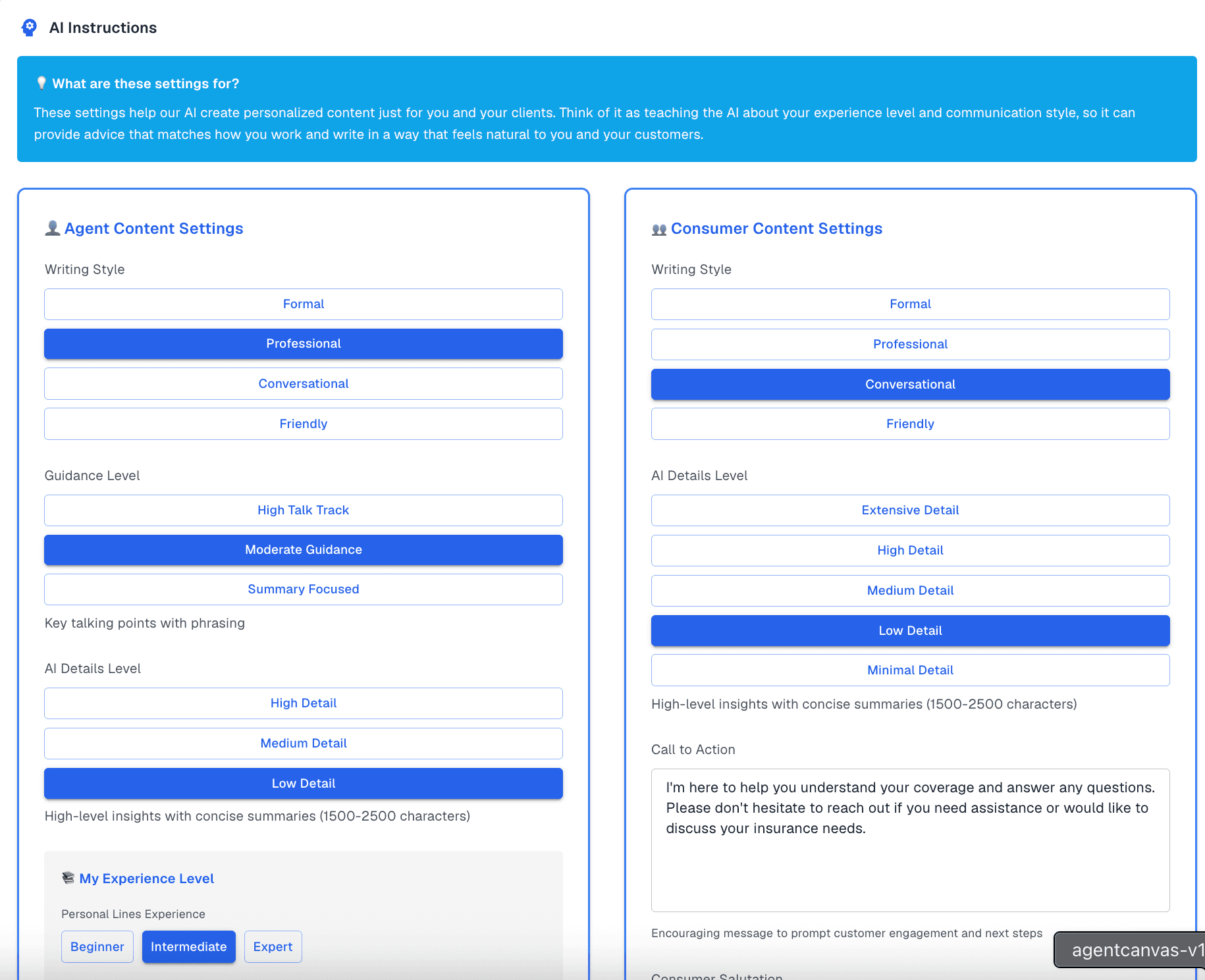
How it writes, and to whom
A briefing for a commercial producer should not read like a letter to a first-time homeowner. Style, level of detail and whether to lead with the risk or the relationship are set by you, per audience.
Chat
53 tools built for insurance work
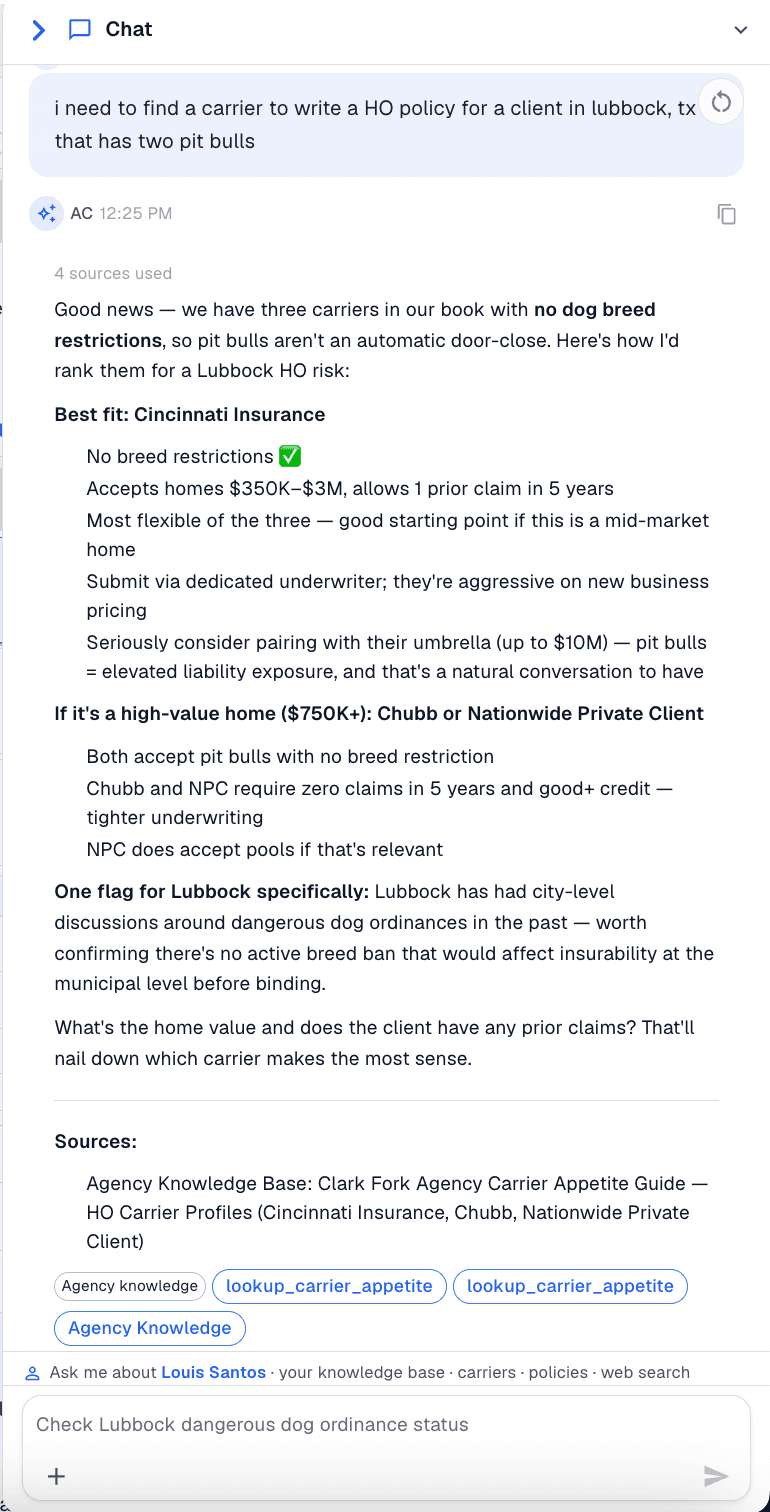
This is not a chatbot with your documents bolted on. Asking a question sets off tools that work on your agency's own records — the policies, the clients, the carrier data you have pulled — and you can see the ones it ran in the conversation as it happens. All of it is recorded. Nothing runs out of sight.
Note what is being asked there. Not a question about an insurance document — a question about who will take this risk, in this town, with this dog. The answer comes back as three carriers with no breed restriction, ranked, with the local ordinance flagged and your own appetite guide named as the source.
Every tool it ran to get there stays visible in the conversation. Your staff can ask it how your agency works, not just what a policy says, and they can see what it read before they act on the answer.
Client intelligence
- “What policies does this household hold?”
- “Pull a pre-call brief before I dial.”
Coverage analysis
- “Where is this account underinsured?”
- “Run a coverage audit and show the gaps.”
Across your clients
- “Which of these renew in the next 30 days?”
- “Which of these carry no umbrella?”
Communications
- “Draft the renewal outreach for this client.”
- “Summarize this thread for the file.”
Daily operations
- “What should I work on today?”
- “Triage what came into the inbox overnight.”
Compliance
- “Show me current compliance status.”
- “Pull the audit trail for last month.”
 Answered from your documents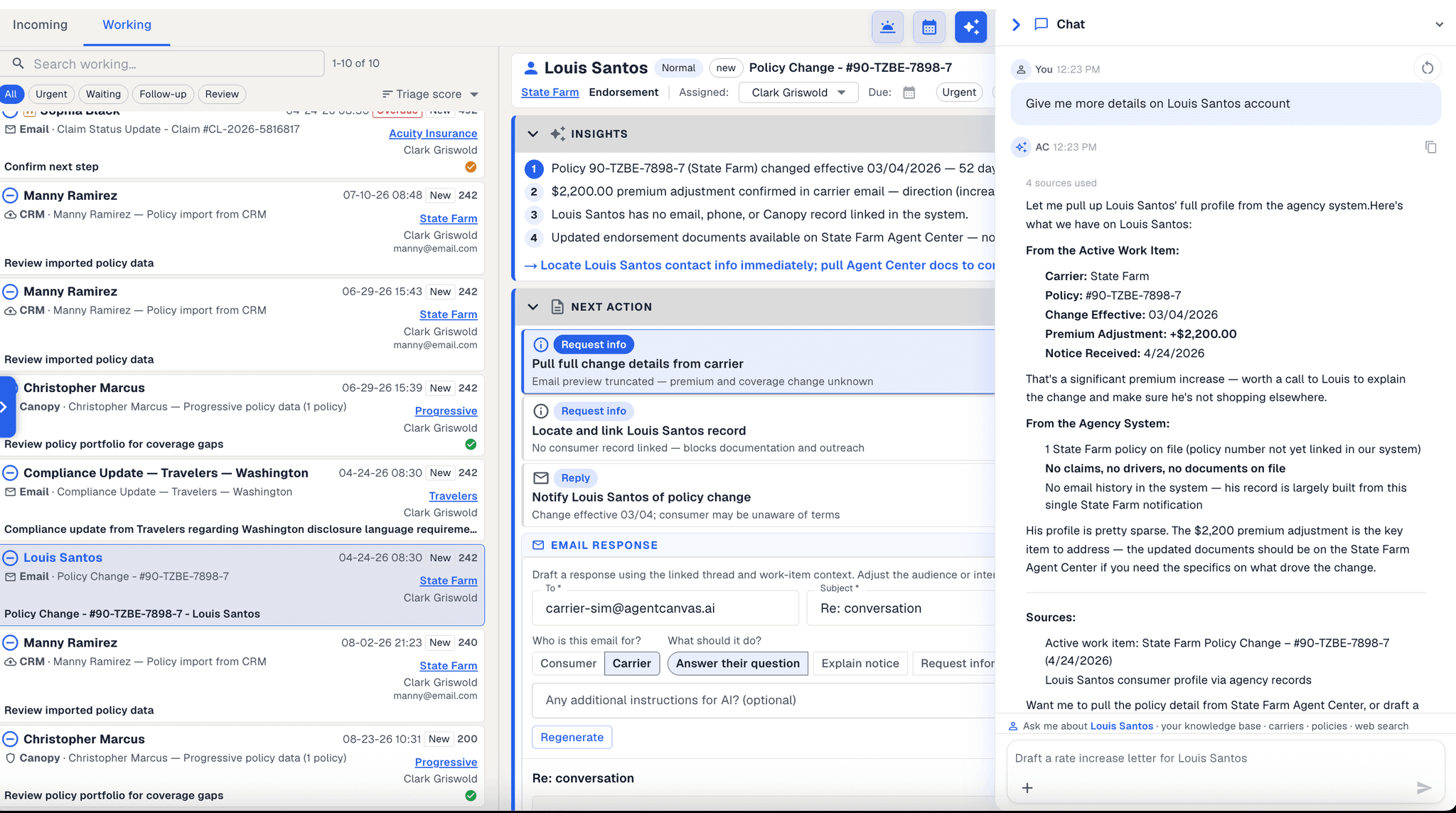
Carrier mail
The mail sorts itself, and then becomes work
Carrier mail is the tax every agency pays, and most of it gets filed by hand. Here it is read on arrival, matched to the client it concerns, and turned into something with an owner and a due date.
Each message is read on arrival, understood for what it is — a renewal, a cancellation, an endorsement, a billing notice — and matched to the client it concerns.
The same inbox can be grouped by transaction, by client or by carrier, without anyone setting up a folder or writing a rule.
It belongs to the agency rather than to one person, so nothing sits unread because it landed with somebody who is out that week.
A message becomes a tracked piece of work in a single step.